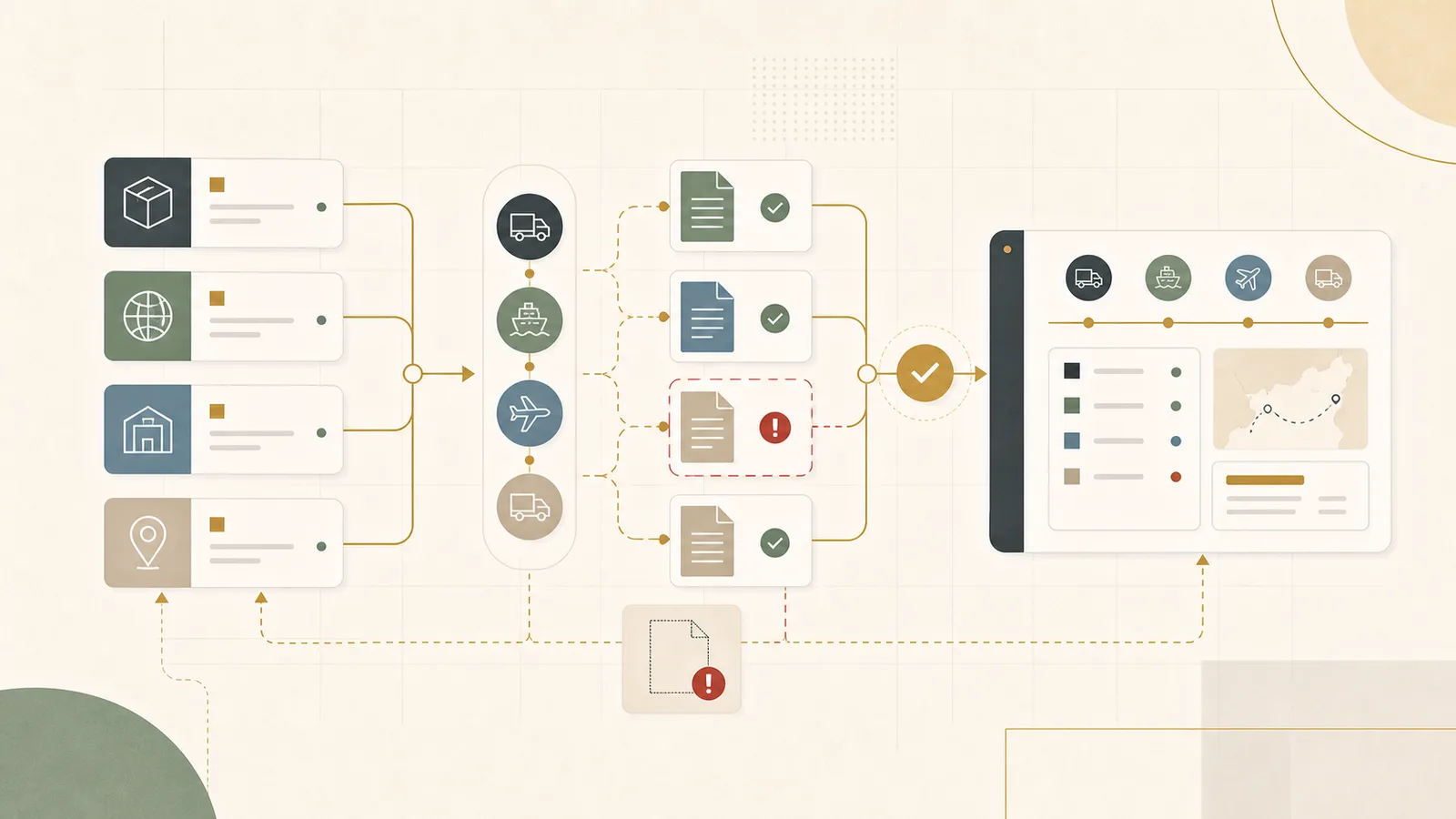
A freight booking usually looks fine right up until it isn't. The carrier confirms the sailing, the container is booked, everyone moves on. Then the document cutoff is a day away, the commercial invoice shows a weight the packing list doesn't, the verified gross mass never came back from the shipper, and the coordinator who knew how to chase all of it is out sick. The booking was never the hard part. The paperwork around it was.
Freight booking and document work looks like admin until it delays a shipment, blocks a customs entry, creates a charge dispute, or leaves a customer without a reliable update. Most of the pain comes from the same root: the status of a shipment depends on whoever last touched the thread. The job of a better workflow is to make what is booked, what is missing, and what changed visible before someone has to chase five inboxes and three portals.
This guide walks through how that work actually moves today, where it tends to break, and a practical way to build a cleaner version without ripping out your systems. It should be useful even if you never talk to us.
Who this lands on first
This usually falls on a logistics manager, a supply chain lead, an operations director, a freight coordinator, or a founder who is still close enough to the shipments to feel every exception. You may already have a transport management system or a forwarder portal. The practical work still happens across email, attachments, spreadsheets, ERP references, WhatsApp threads, and phone calls.
The pain shows up when bookings, bills of lading, commercial invoices, packing lists, customs documents, carrier milestones, delivery appointments, and proof of delivery are not tied to one another. Everyone can ask for status. Nobody can answer it without opening four places. When volume rises, or the one person who holds the map goes on leave, the gaps become expensive fast.
Why a booking problem is usually a document problem
It is tempting to treat this as a booking issue and go shopping for a better transport management system. That can help later, but it rarely fixes the day-to-day. The reason a shipment stalls is almost never that the booking was wrong. It is that a document is missing, a weight does not match, a customs field is incomplete, or a carrier update never made it back to the person answering the customer.
Booking and documents are two halves of the same shipment, and most teams track them in different places. The booking lives in the carrier portal or the TMS. The documents live in email and shared drives. The customs entry lives with the broker. The milestone lives in an EDI feed nobody reads. As long as those stay separate, someone has to reassemble the shipment by hand every time a question comes in.
A useful freight workflow makes each shipment understandable at a glance: what is booked, which document is still outstanding, which milestone moved, which exception needs a decision, and who is waiting on an update. The point is not to automate every freight decision. It is to cut the blind spots and the handoffs.
How a shipment actually moves today
In most forwarders and shipper logistics teams, the flow looks sensible written down. The trouble is in the joins between the steps.
- A booking request arrives from a shipper, a customer, or an internal sales team, often as a loosely formatted email with an attachment.
- A coordinator books space with the carrier, forwarder, or broker and gets a confirmation with a booking number, vessel or flight, and cutoffs.
- The shipper or supplier sends documents: commercial invoice, packing list, and whatever the mode and destination require.
- The coordinator checks the documents against the booking, chases anything missing, and prepares the bill of lading or air waybill instructions.
- Customs and compliance steps run in parallel: certificate of origin, dangerous goods paperwork, the security filing on US ocean imports, the entry with the broker.
- The carrier posts milestones as the shipment gates in, loads, departs, arrives, clears, and delivers.
- Customer service pulls whatever status they can find and sends an update, usually by hand.
- After delivery, proof of delivery, freight invoices, and any accessorial charges come back and have to be matched to the original shipment.
The shape is fine. The failure is that the handoffs are fragile and the shipment truth is scattered. A booking reference sits in one system, the invoice in an email, the ERP shipment number is different again, and the carrier milestone never reaches the person who owes the customer an answer.
Where the workflow loses the thread
The breakpoints are predictable. They look slightly different by lane and mode, but the underlying pattern repeats.
The shipment has no single identity
The customer calls it a PO number. The carrier calls it a booking number. The bill of lading has its own reference. The ERP has a shipment ID. The invoice has yet another. Without one identity that ties these together, every status question turns into a small investigation, and matching charges or documents back to the shipment becomes guesswork.
Missing documents surface too late
Document gaps are often found after pickup, or right up against a cargo cutoff, a customs deadline, or a flight tender. By then the fix is urgent and defensive. A container rolls to the next vessel, a customs entry waits, or a shipment ships without a document that the destination needs, which becomes someone else's problem on arrival.
Carrier updates stay stuck in inboxes
Status updates arrive as emails, portal notifications, and EDI messages in different formats from different carriers. Someone copies the useful ones into a spreadsheet or a customer email. The rest sit unread. The moment that copying stops, the shipment record and reality drift apart.
Charges, invoices, and proof of delivery do not tie back
Freight invoices, demurrage and detention charges, and proof of delivery files come back days or weeks later, often without a clean reference to the shipment. Disputing a wrong charge or answering a customer claim then means reconstructing the whole shipment from scratch, usually under time pressure.
One person holds the hidden map
The workflow quietly depends on a coordinator who knows which forwarder sends updates in which format, which customer needs which documents, which carrier portal to check, and which spreadsheet is current. That knowledge works until volume rises or that person is unavailable, at which point the team discovers how much was never written down.
AI gets added before the shipment file is trustworthy
It is tempting to point an AI tool at the inbox and hope it sorts the chaos. But if the underlying shipment has no single identity and documents are not linked to it, AI will summarize an unreliable picture more fluently. It can make a fragile process look calmer than it is.
What a shipment workbench needs to hold
The minimum better version is a shipment workbench: one place that joins the request, the booking, the required documents, the carrier milestones, the exceptions, and the notes for one shipment. It can be simple. It has to be joined. If the team cannot see what is booked and what is outstanding without chasing, the workflow is still living in people's heads.
A workable version usually holds a few things:
- One shipment file that links the commercial order, the booking, the carrier or forwarder, the documents, the milestones, and the owner under a single reference.
- A document checklist that changes by mode, route, customer, and product, so the team knows what a given shipment needs before it moves.
- A missing-document queue with due dates tied to the real cutoffs, an owner for each item, and a link to the source file.
- A milestone and exception log that keeps carrier facts separate from internal commentary, so nobody confuses a guess with a confirmed event.
None of this requires a new platform in week one. It requires deciding what one shipment should show and where each piece comes from.
A worked example: one ocean export that rolls
This example is illustrative, not a real customer. Say a mid-size freight forwarder handles around 200 shipments a month across ocean and air, with a small coordination team and a customer service desk. The volume is manageable on a good week and overwhelming when a few things slip at once.
A shipper books a full-container ocean export to Rotterdam. The carrier confirms the sailing with a cargo cutoff on Thursday and a document cutoff a day earlier. The commercial invoice comes in on Monday, but it lists a gross weight that does not match the packing list, and the verified gross mass has not been submitted. The coordinator who normally catches this is covering two other desks that week. The mismatch sits unnoticed in an email thread. On Wednesday afternoon, the carrier flags the missing verified gross mass. There is no time to reconcile the weight and resubmit before the cutoff, so the container rolls to the next sailing. The customer hears about it on Friday, after they had already promised their own buyer a delivery date.
Now run the same shipment through a joined workbench. On Monday, the document checklist for an ocean export already lists the commercial invoice, the packing list, and the verified gross mass as required. The invoice arrives and lands on the shipment file, where a simple check catches that its weight does not agree with the packing list. The verified gross mass shows as outstanding, with a due date set to the document cutoff, not the sailing. The missing item and the weight mismatch appear on the desk on Monday, three days before they can hurt anyone, with a clear owner. The coordinator, or whoever is covering, fixes the weight and chases the verified gross mass while there is still room to. The container makes its sailing.
Nothing here is exotic. The difference is that the problem became visible when there was still time to act, instead of at the cutoff. A forwarder at this volume might only roll a handful of containers a month for reasons like this, but each one costs a booking, a customer conversation, and often a demurrage or detention charge downstream.
Build the document checklist before you automate anything
The document checklist is the anchor. Before any tool, the team needs to agree what each kind of shipment actually requires and when each document is genuinely due. That one artifact prevents most late-stage surprises, because it turns a vague "did we get everything?" into a specific list with deadlines.
The exact list depends on your lanes and commodities, but a starting version usually looks like this:
| Shipment type | Documents that gate the move | Hard deadline | Who owns it |
|---|---|---|---|
| Ocean export, full container | Commercial invoice, packing list, verified gross mass, bill of lading instructions, certificate of origin or dangerous goods declaration where relevant | Document cutoff, usually a day or more before the cargo cutoff and sailing | Forwarder coordinator with the shipper |
| Air export | Commercial invoice, packing list, shipper's letter of instruction, air waybill details, dangerous goods declaration where relevant | Tender cutoff before the flight | Forwarder coordinator with the shipper |
| Ocean import clearance | Bill of lading, commercial invoice, packing list, security filing on US imports, customs entry, arrival notice | Security filing before loading at origin; entry before free time runs out at destination | Customs broker with the importer |
| Domestic road move | Bill of lading, delivery appointment, proof of delivery | Pickup and delivery windows | Carrier with the coordinator |
Once this exists, everything downstream has something to check against. A document either matches the checklist for its shipment type or it flags an exception. That is the difference between chasing from memory and chasing from a list.
The shipment file that ties it together
The second artifact is the shipment file itself: the joined view where a booking, its documents, its milestones, and its open items live under one reference. The value is that anyone can look at it and see the same story, instead of each function seeing only its own slice.
A simple version of what the workbench surfaces on any given day:
| Shipment | What is still open | Owner | What happens next |
|---|---|---|---|
| Air export to Frankfurt | Commercial invoice shows the wrong weight | Customer service | Hold the air waybill until the corrected invoice is attached |
| Ocean booking to Rotterdam | Sailing confirmed, packing list not yet received | Coordinator | Escalate to the shipper if it is not in before the document cutoff |
| Domestic pallet move | Account team is asking for proof of delivery | Freight coordinator | Pull the carrier's proof of delivery and link it to the order |
The table is deliberately plain. Its job is to move the team from "who knows the status of this shipment?" to "the status is on the file, and here is who owns the next step." That shift is most of the win.
The data and systems to connect
Part of this work is systems integration and part of it is document discipline. Many freight workflows do not fail because the data is missing. They fail because the data is not normalized and not linked to a shipment a business user actually recognizes.
For most teams, the sources worth connecting first are:
- Order and transport data: ERP, order management, or TMS records for the shipment request, order reference, customer, mode, lane, and value.
- Carrier and partner updates: carrier, broker, and forwarder feeds for booking confirmation, pickup, departure, arrival, clearance, delivery, and exceptions.
- Documents: shared drives and email attachments holding bills of lading, commercial invoices, packing lists, customs forms, certificates, freight invoices, and proof of delivery.
- Customer and service context: CRM or account notes for priority, communication rules, and the commitments you have made to each customer.
You do not need all of this connected perfectly on day one. You need enough of it joined that one shipment can be understood without opening five places.
The tools usually involved
The workflow normally touches more systems than people expect. A single shipment can pass through a TMS, one or more carrier and forwarder portals, EDI feeds, a customs broker's platform, a shared drive, email, an ERP, and a spreadsheet or two that the team quietly relies on.
Freight technology has moved toward this problem. Transport management systems handle booking and rating. A growing set of freight visibility and document platforms focus on tracking, milestone feeds, and pulling structured data out of shipping documents. These can genuinely help. The question they do not answer for you is where the reviewed truth for a given shipment lives. If the answer is "in whichever inbox the coordinator checked last," the setup is still fragile, no matter how good any single tool is. The checklist, the missing-document queue, and the shipment file need to point at one another.
Where AI helps inside the workflow
Freight is a strong fit for AI precisely because so much of the work arrives as unstructured documents and messages. Used carefully, it removes real manual lift:
- Extraction: pulling shipment references, dates, weights, parties, lanes, and document facts out of attachments so they do not have to be re-keyed.
- Checking: comparing a commercial invoice against a packing list, or a booking against the documents received, and flagging mismatches like the weight problem in the example above.
- Classifying and routing: identifying which document is which, spotting what is missing for a shipment type, and sending each gap to the right owner.
- Summarizing updates: turning a batch of carrier notifications into a plain note of what changed since the last confirmed status.
- Drafting: preparing customer or internal updates for delays, paperwork gaps, appointment changes, or proof of delivery requests, ready for a person to check and send.
The word that keeps this safe is first-pass. AI moves information into shape. It preserves the source file and hands a person a clear draft. It should not be the last check on anything that ships.
What still stays a person's call
AI can extract a weight, flag a missing certificate, and draft a delay email. It cannot decide whether a shipment is safe and correct to release, or what you are willing to promise a customer. Those stay with a person, and the workflow should protect that, not erode it.
Human judgment still owns:
- Whether a document is genuinely complete and correct enough to ship against, especially where customs, dangerous goods, or destination requirements are involved.
- What to tell a customer when a shipment slips, and what new date to commit to.
- Which exceptions are noise and which ones need to stop a booking.
- How to handle a disputed charge or a claim, where the facts and the relationship both matter.
A good workflow does not remove these decisions. It clears away the copying, searching, and reconstructing so the people making them are working from a clean picture instead of a scavenger hunt.
Start with one trade lane, not the whole freight desk
The most common mistake is trying to fix every mode, lane, and customer at once. That turns into a systems project that stalls. The better first move is to pick one trade lane or one shipment type where the pain is obvious, and build the checklist, the shipment file, and the missing-document queue just for that.
Good starting points are usually a high-volume export lane, a customer whose documents are always late, an import flow where customs timing bites, or a mode where rolled shipments and charges are hurting. Get one of those to run cleanly through a joined workbench, prove it, then extend the same pattern to the next lane. If you cannot describe the manual workflow for one lane, you are not ready to automate it, and the honest first fix is usually the boring one: one checklist, one shipment file, one owner list, one weekly review of what is at risk.
A practical first 90 days
You do not need a freight technology transformation to make progress. A focused build over about three months is usually enough to get the first working version in place.
| Period | Focus | What should exist by the end |
|---|---|---|
| First 30 days | Make one lane's shipments visible | One shipment file joining request, booking, required documents, milestones, and owner; a missing-document queue with due dates tied to real cutoffs |
| Days 31 to 60 | Make the chasing repeatable | Document checklists by shipment type, carrier updates landing on the shipment file, owner rules for each exception, and first AI extraction on the highest-volume documents |
| Days 61 to 90 | Extend and connect the money | Charge and proof-of-delivery matching back to the shipment, exception alerts ahead of cutoffs, a second lane brought in, and a grounded decision on whether a TMS change or integration is worth it |
The 90-day goal is not a perfect freight system. It is a working routine: key shipments are joined, missing documents surface early, updates come from one place, and the team can see what is at risk without rebuilding it from inboxes.
How Ubisar would implement this workflow
In week 1, Ubisar would choose one freight lane or shipment type with you and map the path from booking request to document check, milestone, exception, and customer or internal update. The first output would be a shipment file with the order reference, carrier or forwarder, required documents, milestone status, the owner of each missing item, exception notes, and links to the source files.
In weeks 2 and 3, we would connect the minimum ERP, order, TMS, carrier, broker, forwarder, document, email, and CRM data needed to keep that file useful, and fix the process and tools around it together. AI would help extract facts from attachments, check documents against the booking, classify what is missing, summarize carrier updates, and draft the delay or paperwork notes, while a person keeps the source files and the final call visible.
By week 4, live shipments should move through the workbench with fewer manual chases and clearer document ownership. At the end of month one, keep going if the team can see what is booked and what is outstanding without reconstructing shipments from inboxes; stop or narrow it if documents still are not tied to a shipment. Ubisar can build that first workbench inside the AI, Data & Tech Implementation service, month-to-month. The pricing page explains how the retainer works, the manual work cost guide helps frame the value of cutting manual chasing and avoidable rework, and you can send us one messy lane through our contact page if you want a specific view on where to start.
Useful next links
Freight document work overlaps with supplier performance, warehouse handoffs, and customer updates. A few useful next reads:
- Use the supplier scorecard and OTIF guide when supplier reliability is what keeps disrupting your shipments.
- Use the warehouse pick-pack handoff guide when a shipment's timing depends on pick-pack status you cannot see.
- Use the customer delivery ETA communication guide when carrier updates need to become clear customer communication.